
Budgets can help you take control of your money and make it work harder for you. A monthly budget template can help you stay organized as you track your income, expenses, savings, and debt repayment. There are different ways to make a budget template, but if you don’t have time to do it yourself, it’s easy to find one online.
If you’re specifically looking for an Excel budget template then you’re in the right place. You’ll find a free budget Excel template you can download to help you better manage your money.
Key Points
• A monthly budget template helps track income, expenses, savings, and debt, providing a comprehensive financial overview.
• The budget template is customizable, allowing users to add, remove, and rename lines to fit personal financial needs.
• The template includes sections for essential and discretionary expenses, savings, and debt repayment, which automatically total calculations.
• Users can track variable expenses like groceries and gas to identify spending patterns and adjust budgets accordingly.
• The template can be used in Excel or Google Sheets, offering flexibility in managing finances.
Options trading online by SoFi Invest.
Monthly Budget Template
There are different types of budgeting methods to choose from, such as the envelope system or the 50/30/20 budget rule. This free budget template can likely work well with many of them. The template allows you to enter your income, expenses, savings, and debt payments to create a comprehensive snapshot of your finances from month to month.
Here’s what you can expect when using this monthly budget template.
Key Components of the Template
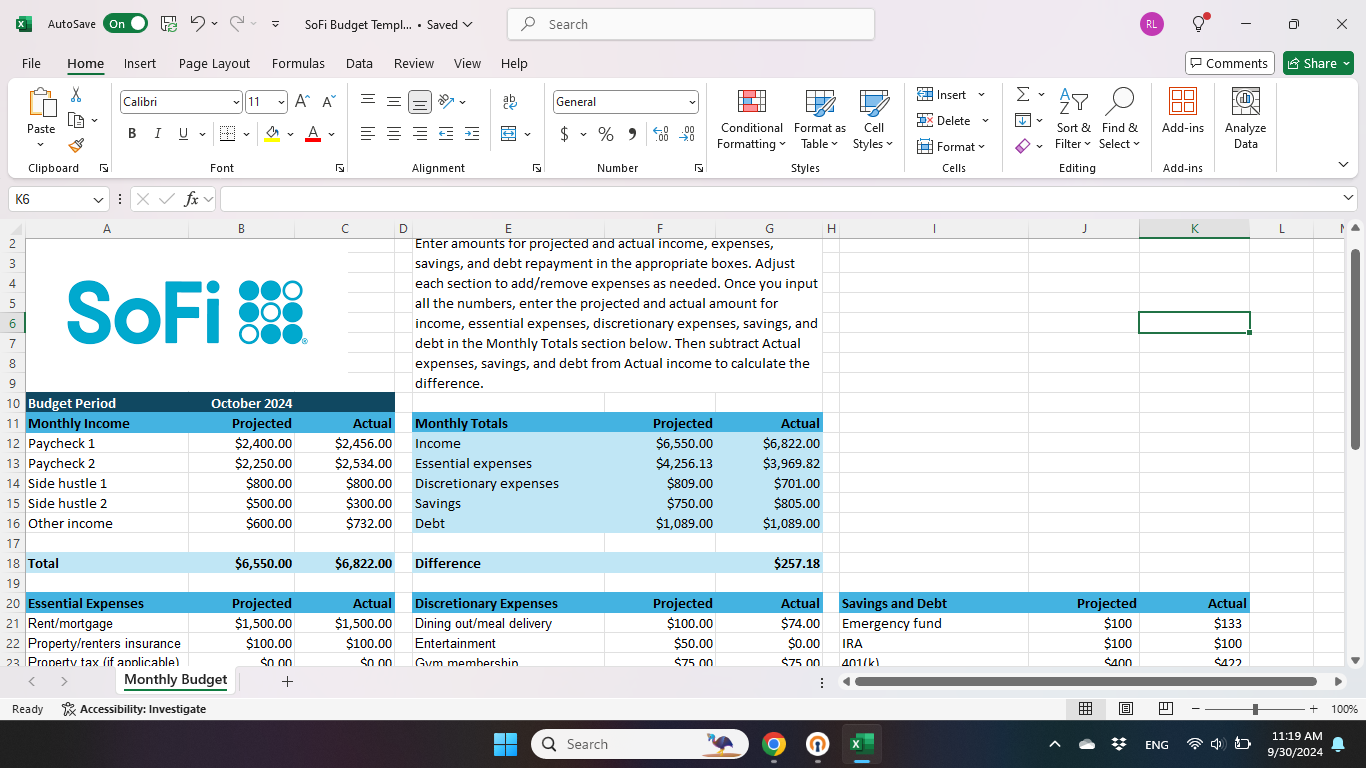
When making a financial plan, it’s important to include the most important components of a budget. This simple budget template is divided into five sections:
• Income
• Essential expenses (the “needs” in life)
• Discretionary expenses (the “wants” in life)
• Savings and debt repayment
• Monthly totals
You’ll be able to enter projected and actual amounts for each section. You can add or remove lines as needed or edit the descriptions for expenses, savings, and debt payments. Totals are calculated for you automatically.
How to Download and Access the Template
Here are steps for downloading the free monthly budget template:
• You can download the Excel budget template here.
• Once you download the file, you’ll open it and then click “Enable editing.”
• You can then save the file to your preferred location on your device, and start using it to make a budget.
If you don’t have Excel, you can open the file in Google Sheets. You’ll need to:
• Download the Excel file
• Open Google Sheets
• Click “File,” then “Import”
• Click “Upload” and “Browse,” then find the Excel file
• Select the file and click “Open”
• In Google Sheets, select “Create new spreadsheet” from the dropdown menu (or this may automatically populate on a pop-up screen), and click “Import data”
• Click the blue “Open now” link to start using the spreadsheet
If you’re opening the file in Google Sheets, you may need to make adjustments to the font or spacing if you have a default font that you use.
Recommended: 50/30/20 Budget Calculator
Increase your savings
with a limited-time APY boost.*
Using the Monthly Budget Template Effectively
Every monthly budget template is different, and you may need to do some customizing to make it your own. Here are some tips for living on a budget and tracking all of the numbers.
• Review each section one by one to determine whether you’ll need to add or remove lines or make changes to descriptions.
• Start by reviewing your monthly income and adding the projected amount for each income stream that you have.
• Enter “Essential expenses” next, using the projected amount for each budget category. Again, you may need to add or remove expenses or adjust the descriptions to match your needs.
• Enter “Discretionary expenses,” using the projected amount for each budget category. There’s plenty of room in the budget template to add additional expense categories if you have them.
• Enter projected amounts for each of your monthly savings goals and debt repayment goals.
• As you pay your essential expenses, add the actual amount spent for each one to your budget template.
• Use the “Expense tracker” tab included in the budget template to record expenses for things like groceries and gas throughout the month. You can then add up the amounts for each category and enter them in the relevant box on the “Monthly budget” tab.
• Enter savings contributions and debt payments in the “Actual” column as you make them.
Once you’ve added your income, expenses, savings, and debt payments and calculated the projected and actual amounts for each category, you can enter those numbers into the “Monthly totals” section. You can then subtract your actual expenses, savings, and debt payments from your actual income to calculate the difference. Managing your budget in this way adds an extra level of insight onto and control of what’s going on in your bank account.
Personalizing Your Budget
The monthly budget template is customizable so you can add or remove items as needed.
For example in the “Income section,” you’ll see room to enter amounts for two paychecks, two side hustles, and an ‘Other’ category. If you only get paid monthly, you can delete one of the paycheck lines. Or if you get paid biweekly and have a three-paycheck month coming up, you can add a line to account for that.
You can do the same with all of the other sections so that your budget template reflects your monthly expenses and savings goals. For example, say that you use sinking funds — money set aside for specific goals — to save money for one-time expenses. You could add individual lines for each one in the “Savings” and “Debt” section.
So your savings goals might include:
• Emergency fund
• Holiday fund
• Vacation fund
• New car fund
Likewise, you might have multiple student loans you’re repaying that you’d like to list separately. Having a projected column and an actual column can be a huge asset. This can help you see how well you’re doing with your spending, savings, and debt repayment goals month to month. That, in turn, can help you manage your money better.
Tracking and Analyzing Your Spending
Failing to track variable or discretionary expenses is one of the most common budgeting mistakes. It’s easy to go over budget if you don’t know what you’re spending.
This budget template includes an “Expense Tracker” sheet that you can use to record spending, outside of what you pay toward the bills. Tracking expenses monthly is a great way to see how your expenses are trending, where your money goes, and what you might want or need to cut back on.
Some of the most helpful expenses to track may include:
• Groceries
• Gas
• Anything that’s in your “Discretionary expenses” category on the template, such as entertainment and dining out
These are the areas of your budget where spending may not be the same month to month. You can look at each expense category and ask yourself what you could do to reduce spending or even eliminate it altogether if you’re trying to free up funds to save or pay down debt.
It’s also helpful to look back each month to see how your essential expenses have changed. Some costs, like your mortgage or rent payments, may always be the same but you might spend more on utilities during certain times of the year than others. Getting to know these patterns can help you adjust your budget accordingly so you’re not surprised by a higher-than-usual electric bill.
Budget Template vs App
Using a budget template is a hands-on way to track your income and spending because you have to enter amounts in the sheet manually. If you don’t have time to do that or you’re worried about getting the numbers wrong, you might use a free budget app instead.
These can let you link your bank account, including checking and savings accounts, in one place so you can see what you’re spending. You can also add investment accounts, retirement accounts, credit cards, student loans, and other loans to track your net worth. Many financial institutions offer these tools, so it can be worthwhile to check with yours, or many third-party apps are available as well, some for free and others with associated costs.
You might also find that a budgeting app can help you move towards your short- and longer-term money goals, as you see where your cash goes and how you can lower debt and build savings over time.
In addition, credit score monitoring may be included so you can see how paying down debt or taking out a new loan affects your credit rating.
Recommended: Ways to Earn Money From Home
The Takeaway
If you’re ready to make budgeting part of your money routine or looking to fine-tune how you track your finances, a monthly budget template can help you do it. This Excel budget template is designed to be user-friendly.
As you work on tracking your money, it’s wise to have a banking partner that helps you manage and grow your wealth.
Interested in opening an online bank account? When you sign up for a SoFi Checking and Savings account with eligible direct deposit, you’ll get a competitive annual percentage yield (APY), pay zero account fees, and enjoy an array of rewards, such as access to the Allpoint Network of 55,000+ fee-free ATMs globally. Qualifying accounts can even access their paycheck up to two days early.
Photo credit: iStock/cagkansayin
SoFi Checking and Savings is offered through SoFi Bank, N.A. Member FDIC. The SoFi® Bank Debit Mastercard® is issued by SoFi Bank, N.A., pursuant to license by Mastercard International Incorporated and can be used everywhere Mastercard is accepted. Mastercard is a registered trademark, and the circles design is a trademark of Mastercard International Incorporated.
Annual percentage yield (APY) is variable and subject to change at any time. Rates are current as of 12/23/25. There is no minimum balance requirement. Fees may reduce earnings. Additional rates and information can be found at https://www.sofi.com/legal/banking-rate-sheet
Eligible Direct Deposit means a recurring deposit of regular income to an account holder’s SoFi Checking or Savings account, including payroll, pension, or government benefit payments (e.g., Social Security), made by the account holder’s employer, payroll or benefits provider or government agency (“Eligible Direct Deposit”) via the Automated Clearing House (“ACH”) Network every 31 calendar days.
Although we do our best to recognize all Eligible Direct Deposits, a small number of employers, payroll providers, benefits providers, or government agencies do not designate payments as direct deposit. To ensure you're earning the APY for account holders with Eligible Direct Deposit, we encourage you to check your APY Details page the day after your Eligible Direct Deposit posts to your SoFi account. If your APY is not showing as the APY for account holders with Eligible Direct Deposit, contact us at 855-456-7634 with the details of your Eligible Direct Deposit. As long as SoFi Bank can validate those details, you will start earning the APY for account holders with Eligible Direct Deposit from the date you contact SoFi for the next 31 calendar days. You will also be eligible for the APY for account holders with Eligible Direct Deposit on future Eligible Direct Deposits, as long as SoFi Bank can validate them.
Deposits that are not from an employer, payroll, or benefits provider or government agency, including but not limited to check deposits, peer-to-peer transfers (e.g., transfers from PayPal, Venmo, Wise, etc.), merchant transactions (e.g., transactions from PayPal, Stripe, Square, etc.), and bank ACH funds transfers and wire transfers from external accounts, or are non-recurring in nature (e.g., IRS tax refunds), do not constitute Eligible Direct Deposit activity. There is no minimum Eligible Direct Deposit amount required to qualify for the stated interest rate. SoFi Bank shall, in its sole discretion, assess each account holder's Eligible Direct Deposit activity to determine the applicability of rates and may request additional documentation for verification of eligibility.
See additional details at https://www.sofi.com/legal/banking-rate-sheet.
*Awards or rankings from NerdWallet are not indicative of future success or results. This award and its ratings are independently determined and awarded by their respective publications.
SoFi Relay offers users the ability to connect both SoFi accounts and external accounts using Plaid, Inc.’s service. When you use the service to connect an account, you authorize SoFi to obtain account information from any external accounts as set forth in SoFi’s Terms of Use. Based on your consent SoFi will also automatically provide some financial data received from the credit bureau for your visibility, without the need of you connecting additional accounts. SoFi assumes no responsibility for the timeliness, accuracy, deletion, non-delivery or failure to store any user data, loss of user data, communications, or personalization settings. You shall confirm the accuracy of Plaid data through sources independent of SoFi. The credit score is a VantageScore® based on TransUnion® (the “Processing Agent”) data.
*Terms and conditions apply. This offer is only available to new SoFi users without existing SoFi accounts. It is non-transferable. One offer per person. To receive the rewards points offer, you must successfully complete setting up Credit Score Monitoring. Rewards points may only be redeemed towards active SoFi accounts, such as your SoFi Checking or Savings account, subject to program terms that may be found here: SoFi Member Rewards Terms and Conditions. SoFi reserves the right to modify or discontinue this offer at any time without notice.
Disclaimer: Many factors affect your credit scores and the interest rates you may receive. SoFi is not a Credit Repair Organization as defined under federal or state law, including the Credit Repair Organizations Act. SoFi does not provide “credit repair” services or advice or assistance regarding “rebuilding” or “improving” your credit record, credit history, or credit rating. For details, see the FTC’s website .
Financial Tips & Strategies: The tips provided on this website are of a general nature and do not take into account your specific objectives, financial situation, and needs. You should always consider their appropriateness given your own circumstances.
Third-Party Brand Mentions: No brands, products, or companies mentioned are affiliated with SoFi, nor do they endorse or sponsor this article. Third-party trademarks referenced herein are property of their respective owners.
SOBNK-Q324-110